AXIOM / DEFENSE FRONTIER CYBER WIRE
Stream Deck Neo starter
Eight browser shortcuts for the DFC Wire, arranged for the Neo's 4 × 2 key grid. No account, access key, device identifier, local path, or third-party plugin is stored.
Before you start
Install the current supported Elgato Stream Deck app, connect the Neo and select the device in the app. Extract the starter ZIP.
Option A: native profile
- Back up any Stream Deck profiles you care about.
- Double-click
DFC-Wire-Neo.streamDeckProfile. - Review the profile name and eight Website actions in the Stream Deck app, then accept the import.
- Select DFC Wire — Reader Neo for the device and test each key.
Option B: manual setup
- Open the Stream Deck app and select the Neo.
- Drag System → Website onto each key.
- Enter the URL from the table. Leave background GET disabled; each press should open the page in your browser.
- Choose the matching 144 × 144 PNG from
icons/. The profile hides app-rendered titles because each icon already has a large label. - Repeat left to right across the top row, then the bottom row.
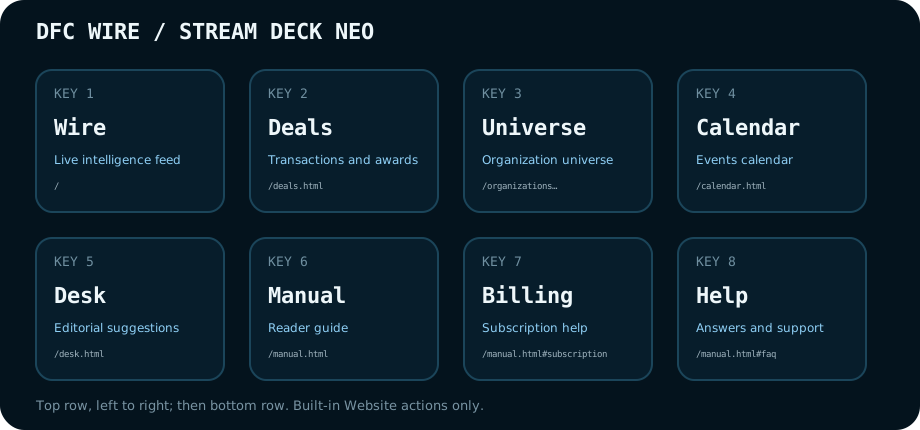
Key map
| Key | Row | Column | Label | URL | Purpose |
|---|---|---|---|---|---|
| 1 | 1 | 1 | Wire | https://dfcwire.com/ | Live intelligence feed |
| 2 | 1 | 2 | Deals | https://dfcwire.com/deals.html | Transactions and awards |
| 3 | 1 | 3 | Universe | https://dfcwire.com/organizations.html | Organization universe |
| 4 | 1 | 4 | Calendar | https://dfcwire.com/calendar.html | Events calendar |
| 5 | 2 | 1 | Desk | https://dfcwire.com/desk.html | Editorial suggestions |
| 6 | 2 | 2 | Manual | https://dfcwire.com/manual.html | Reader guide |
| 7 | 2 | 3 | Billing | https://dfcwire.com/manual.html#subscription | Subscription help |
| 8 | 2 | 4 | Help | https://dfcwire.com/manual.html#faq | Answers and support |
Neo controls
The profile puts Elgato's built-in 24-hour Digital Time action in the Infobar. Neo's two Touch Points change pages. This starter has one action page, so the Touch Points become useful when you add another page; they are not repurposed as action keys.
Access and privacy
Sign in with your account email through the normal Wire page in your browser. Do not put a sign-in link or other credentials into a Website-action URL. Billing opens subscription help; choose MANAGE on the signed-in Wire for your personal billing portal. The profile opens only the eight HTTPS URLs shown above.
Evidence and limits
The layout follows Elgato's official Neo documentation: eight customizable LCD keys, an Infobar and two Touch Points for page navigation. The Website behavior follows Elgato's official System Actions guide. The native archive uses the profile structure found in Elgato Stream Deck 7.5.1 and its bundled Neo default profile. Archive integrity, manifests, action types, coordinates, URLs and PNG dimensions are automatically checked. Physical-button behavior remains to be checked on the target device.
Official references: Elgato Neo documentation; Elgato System Actions; Elgato Action Sharing. Checked 17 September 2026.